What MovementModeler Does
MovementModeler is a way to collect and inspect motion data without setting up a lab or wrestling with a full pipeline first. It’s just: phone, video, data.
Motion Data, Anywhere
Record or import video on the phone students already carry. MovementModeler works indoors and outdoors, including in bright sunlight. As with any vision system, stable framing and reasonable video quality help the tracking.
Stick-Figure Visualizations
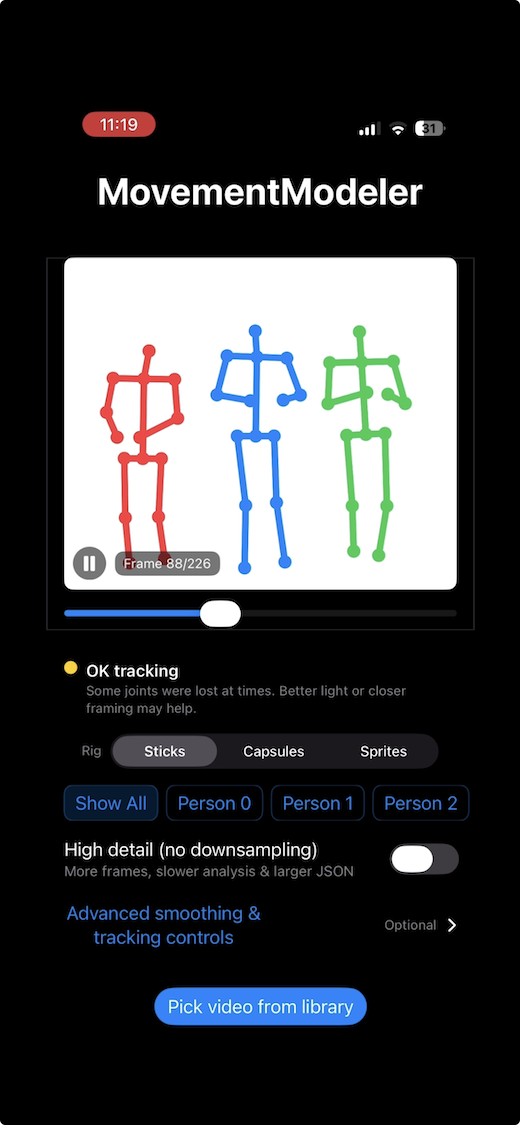
Generate stick-figure, capsule, or sprite-based motion videos that make movement easier to see and discuss. Students can scrub and replay clips for quick visual QC before doing any analysis.
Pose Data for Analysis
Export BODY-25 style pose data per frame and per person. From there, it’s your world — Python, MATLAB, R, or whatever tools you prefer for features, metrics, and models.
Where It Might Fit
These are just a few places MovementModeler can be useful.
Pose Estimation & Beyond
- Intro labs on keypoints, occlusion, and tracking.
- Small projects on action recognition or gesture classification.
- Capstones that start from students’ own recordings instead of static datasets.
- Metadata labels make it easy to organize and batch-process student-collected data.
Movement & Gait
- Comparing joint trajectories between conditions or techniques.
- Teaching kinematics with simple stick-figures and time series.
- Linking qualitative observation to basic quantitative measures.
- Activity and camera-angle tags keep clinical data organized.
Technique & Consistency
- Looking at form in jumps, cuts, pivots, or landings.
- Exploring left–right differences or stability over time.
- Letting students try simple performance metrics of their own.
From Video to Labeled Data, Briefly
The workflow is straightforward. The goal is to get out of the way so students can focus on the ideas you’re teaching.
- 1. Capture or import. Film on an iPhone or use an existing clip.
- 2. Check the visualization. Quick visual QC with sticks, capsules, or sprites. Adjust confidence and smoothing for obvious spikes/noise.
- 3. Tag metadata. Label the activity, camera angle, and target subject before export.
- 4. Export for analysis. Use the metadata-enriched JSON in notebooks and the MP4 in reports/presentations.
Python Tools (Optional)
For classes that already use OpenPose-style tooling, we maintain two small scripts that help bridge MovementModeler exports into common workflows.
# 1) MovementModeler clip export -> per-frame OpenPose-style JSON
python scripts/mm_to_openpose.py movementmodeler_clip.json frames_json/

# 2) Per-frame JSON -> stick-figure MP4
python scripts/mm_json_dir_to_stickmp4.py frames_json/
Repo: movementmodeler-tools
If you’d like to see it in action
A short screen capture showing the basic flow: import a clip, inspect the visualization, tag with metadata, and export MP4 + JSON.
Quick notes for best results
- Stable framing helps.
- Higher resolution and less motion blur generally track better.
- Outdoor clips in bright sunlight work well.
Instructor FAQ
Where can students use MovementModeler?
Anywhere they can film. The app works indoors and outdoors, including in direct sunlight. Steady framing and clear subjects help the results.
Do students need special hardware?
Just a reasonably recent iPhone. Analysis can happen in whatever environment you already use — Python, MATLAB, etc.
What does the export look like?
Exports include stick-figure MP4s and BODY-25 style pose data with coordinates and confidence values per joint, per frame, per person. The JSON also includes an lmm metadata block with the activity label, camera angle, and target subject index you set before exporting.
What’s the metadata for?
It makes your data self-describing. Instead of tracking which file is which in a spreadsheet, every export carries its own activity label, camera angle, and subject index. This is especially useful when students collect multiple clips across conditions or sessions.
Can we build our own tools on top?
Yes. The intent is that you and your students treat the exported data as raw material. The optional tools repo exists to make it easier to slot into existing workflows.